October 7, 2026
Self-Custody Bitcoin Wallets Versus Community Custody Fedimint Federations
With bitcoin, whoever holds the private keys controls the money — “not your keys, not your coins,” as the well-known adage goes.
And so, for years, the standard advice among Bitcoin enthusiasts has been to hold your own key in a self-custody wallet, which is a wallet in which you, and only you, control the private key that authorizes spending.
Most self-custody wallets are built around a single key, backed up by a single seed phrase — a 12-to-24-word list that can recreate that key. This setup removes trusted third parties from the picture, but it puts all of the risk on one person who holds that one secret, a secret that must be transcribed on paper or stamped onto stainless steel and then kept safe in the physical world.
Community custody, the model behind every Fedimint Federation in the Fedi app, takes a different approach. A small group of trusted people, Guardians, jointly run a multisignature (multisig) bitcoin wallet, a bitcoin wallet composed of multiple keys, that functions simultaneously as an ecash mint. That is, the bitcoin is secured on the base chain, where no single Guardian, device, or seed phrase can move them, while, at the same time, users who transfer their bitcoin into the federation can then use that bitcoin as ecash within the federation or as sats that are spendable over either the Lightning Network (Lightning) or on the Bitcoin main chain (“on-chain”).
This piece explains how community custody via a Fedimint works, provides an overview of the main types of single-key self-custody wallets, and compares the two.
Self-Custody Bitcoin Wallets
A self-custody wallet that enables you to control your private Bitcoin key, and, therefore, your funds. No exchange can freeze your account, and no company can lose your bitcoin in a hack or bankruptcy.
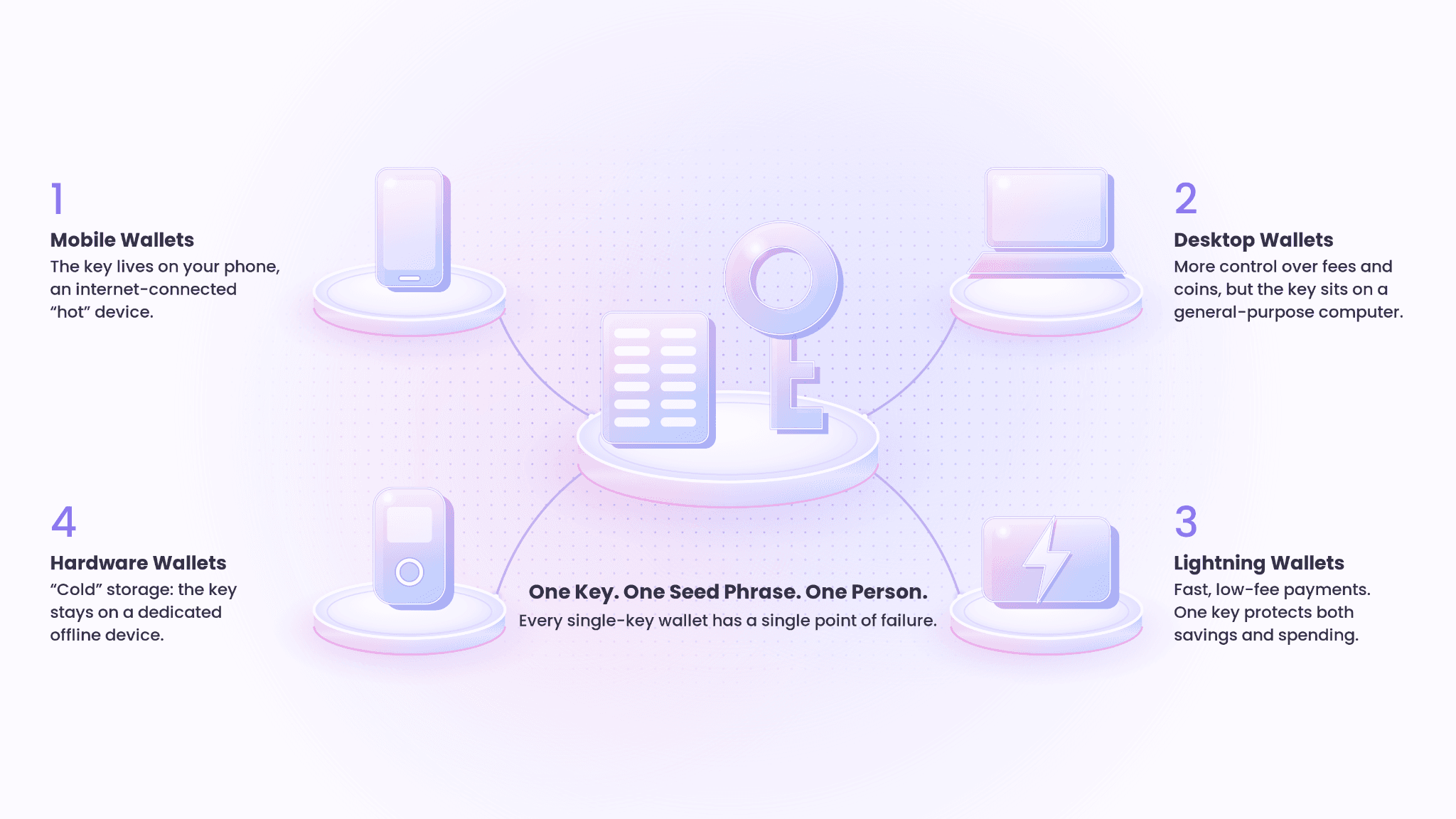
Self-custody wallets come in several forms. They differ in where the key is stored and which network they use, but nearly all share one trait: a single key.
Self-Custody Bitcoin Base Chain Mobile Wallets
These apps run on your phone and send and receive bitcoin directly on the Bitcoin main chain. Examples include:
BlueWallet
Blockstream App (formerly Blockstream Green)
Bull Bitcoin Wallet (this wallet also includes Lightning functionality)
These are "hot" wallets, meaning the key lives on an internet-connected device. That makes them convenient, but a phone can be infected with malware or phished. On-chain payments also carry network fees and wait for block confirmations, so these wallets suit saving better than small, everyday purchases.
Self-Custody Bitcoin Base Chain Desktop Wallets
Desktop wallets often offer finer control over things like coin selection, fee settings, and connecting to your own Bitcoin node. Many people use them as the companion app for a hardware wallet (we’ll get to those in just a moment).
Examples include:
Sparrow Wallet
Electrum
Bitcoin Core (a wallet is built into the node software)
Used on their own, they're still hot wallets: the key sits on a general-purpose computer that can be compromised.
Self-Custody Bitcoin Lightning Wallets
These wallets let you make near-instant, low-fee payments over the Lightning Network, which makes them well suited for spending.
Examples include:
Phoenix
Zeus
Cake
Bull Bitcoin
These wallets are dynamic in that they’re also on-chain Bitcoin wallets. With them, you can save on-chain and spend over Lightning without switching wallets.
The trade-off is more moving parts, such as payment channels, inbound liquidity, and channel-opening fees. And, as with any mobile wallet, the key sits on your phone.
Also, with these wallets, it means that one key protects both your savings and your spending money.
Cold Storage Hardware Wallets
Hardware wallets generate and store your key on a dedicated device that never exposes it to the internet. You build a transaction in a companion app (like the aforementioned Sparrow Wallet or Trezor and Ledger’s companion apps — Trezor Suite and Ledger Live), sign it on the device, then broadcast it.
Examples include:
Trezor
Ledger
Blockstream Jade
Foundation Devices
This is the strongest protection against malware and the most common way people store long-term savings.
Hardware wallets still carry risks. Buying one online usually means handing over your name, address, and email, and that data can leak, as it did when ShipMonk, one of Trezor's shipping providers, suffered a breach. Ledger has also been subject to many data breaches.
The Common Thread: A Single Point of Failure
Mobile or desktop, on-chain or Lightning, hot or cold, each of these wallets relies on one key and one seed phrase, held by one person. That is a single point of failure.
Also, if a self-custody wallet isn’t designed securely, users can have their funds stolen, which happened in the recent Coldcard hack.
Community Custody
The Fedimint Community custody model, the fourth way for bitcoin custody, keeps self-custody's core promise — no third-party controls your money — while removing the single point of failure.
Community Custody via Federations
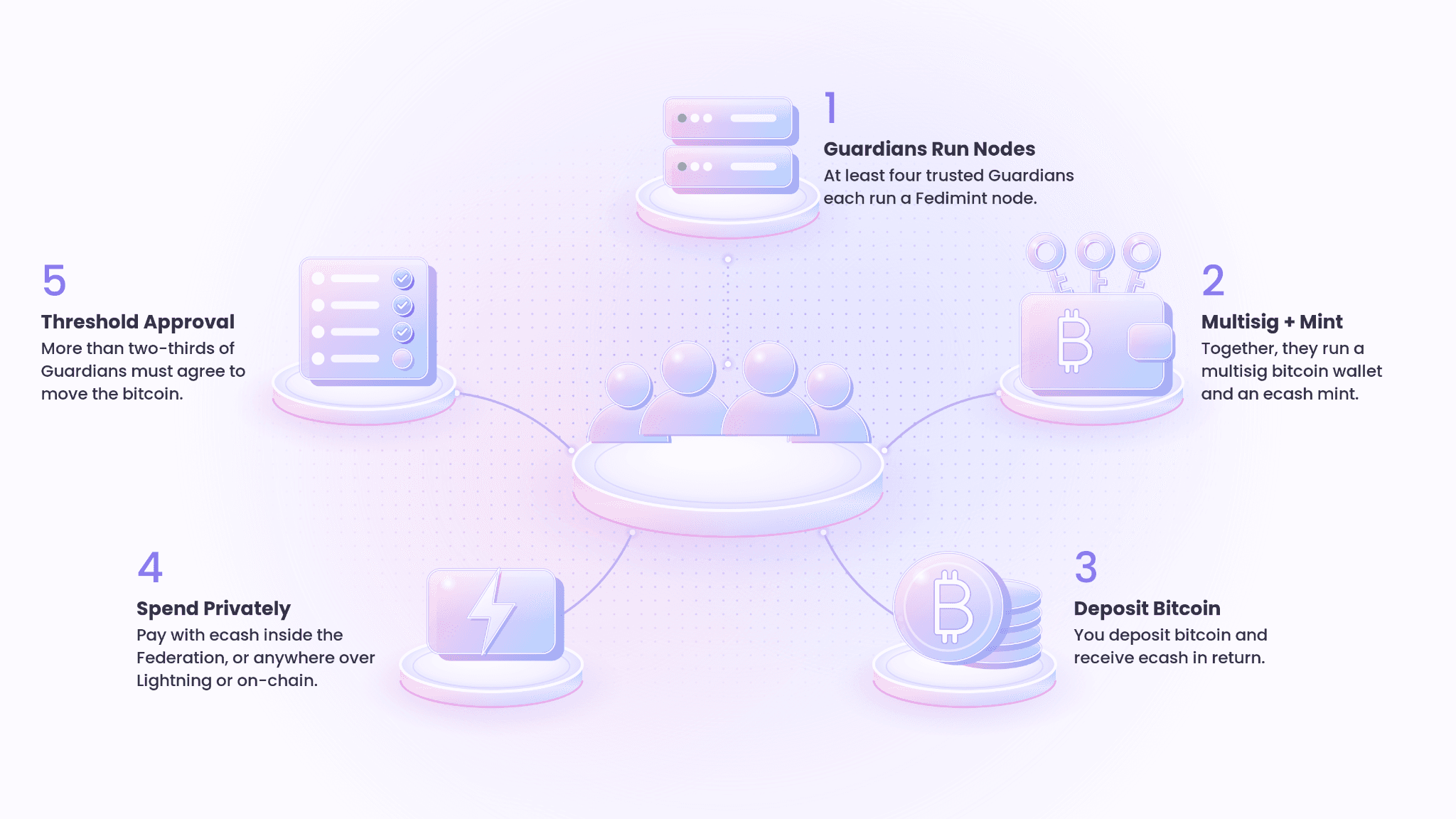
A Federation forms when at least four Guardians each run a Fedimint node on a laptop or a home server such as an Umbrel or Start9. (Please note that laptops must remain online for a federation to continue functioning properly.) Together, they create a multisig bitcoin wallet and an ecash mint. Guardians might be members of your family, savings club, church, or local community.
Moving funds from the multisig wallet requires more than two-thirds of the Guardians to agree. No single Guardian, device, or seed phrase can drain the Federation. At the same time, users can withdraw the bitcoin they’ve put into the federation freely either on-chain or over Lightning.
Multisig Security with Lightning and Ecash Usability
With self-custody, you usually have to choose. Multisig and cold storage are secure but slow and complex, so they suit savings. Lightning is fast, but typically means a single hot key on your phone.
Community custody removes that choice. Your bitcoin is secured by the Federation's multisig wallet, while you hold and spend it as ecash. Within the Federation, ecash payments are near-instant. Beyond it, you can pay any Lightning invoice without managing channels or liquidity yourself.
Built for Spending Privately, Not Just Saving
On-chain transactions are recorded on a public ledger that anyone can inspect. Exchanges and hardware wallet retailers collect personal data that can leak.
A Federation avoids both. Joining one doesn't require your name, address, or ID, so there's nothing to leak later. Ecash is based on David Chaum's blind-signature design, so the Guardians who issue it can't see who is paying whom. Payments inside a Federation aren't broadcast to a public ledger or logged against your identity.
That makes community custody useful not only for holding bitcoin safely, but for spending it privately day to day.
Trade-offs to Keep in Mind
Community custody asks you to trust the Guardians not to collude, not to lose their seed phrases, not to issue more ecash than the bitcoin the Federation holds, and to keep their nodes online. If too many nodes go offline, funds freeze until the nodes come back online.
Software risk also applies to every kind of wallet. Whether you use a hardware wallet, a mobile app, or a Federation, you're relying on the underlying code being sound.
Conclusion
Self-custody wallets give you full control, but with a single key they also give you full responsibility, and a single point of failure, whether that key lives on a phone, a laptop, or a hardware device.
Fedi's community custody spreads that responsibility across a group of trusted Guardians, pairing multisig security with the speed of Lightning and the privacy of ecash.
Self-custody remains a strong choice for people who are technical, careful, and willing to maintain a setup for decades. For those who feel uneasy with such a setup, community custody offers a way to save and spend bitcoin privately without carrying all the risk alone.
