
April 20, 2026
Exolix: Swap Bitcoin for Stablecoins and Other Digital Assets Privately Inside Fedi
You can now swap bitcoin for other digital assets using Exolix. Exolix is a non-custodial cryptocurrency swap service that was recently added to the Fedi Mini Apps catalog.
With Exolix on Fedi, anyone can exchange assets instantly and securely, without creating an account or sharing personal information.
What is Exolix?
Exolix is a non-custodial multichain swap aggregator that has been operating since 2018. Over that time, it has built a reputation for fast, reliable crypto swaps and a strong commitment to user privacy.
The platform connects you to liquidity across 200+ blockchains, enabling swaps between more than 2,600 digital assets with 4 million possible trading pairs.
You can also think of it as a search engine for exchange rates. When you request a swap, Exolix scans multiple liquidity sources and then routes your transaction through the best available rate.
Exolix also supports Bitcoin Lightning swaps, which is the payment rail supported on the Fedi app.
To support their commitment to privacy, Exolix doesn’t require you to register to use their service. You don’t have to input an email address, a phone number, or an ID document before using the service.
Most centralised exchanges require full identity verification before you can trade. Government-issued ID, selfies, proof of address.
For people living under unstable governments or in regions where financial surveillance puts individuals at risk, those requirements can be dangerous.
How to Add Exolix as a Mini App on Fedi
Step 1: Tap the “Mini Apps” button toward the bottom right of the Fedi screen.

Step 2: Tap the plus sign (+) toward the top right and tap on “Add from Catalog.”

Step 3: Search for “Exolix” and tap “Add.”

Exolix now appears as one of your personal Mini Apps.

How to Use Exolix on Fedi
Step 1: Open the Exolix Mini App inside Fedi.
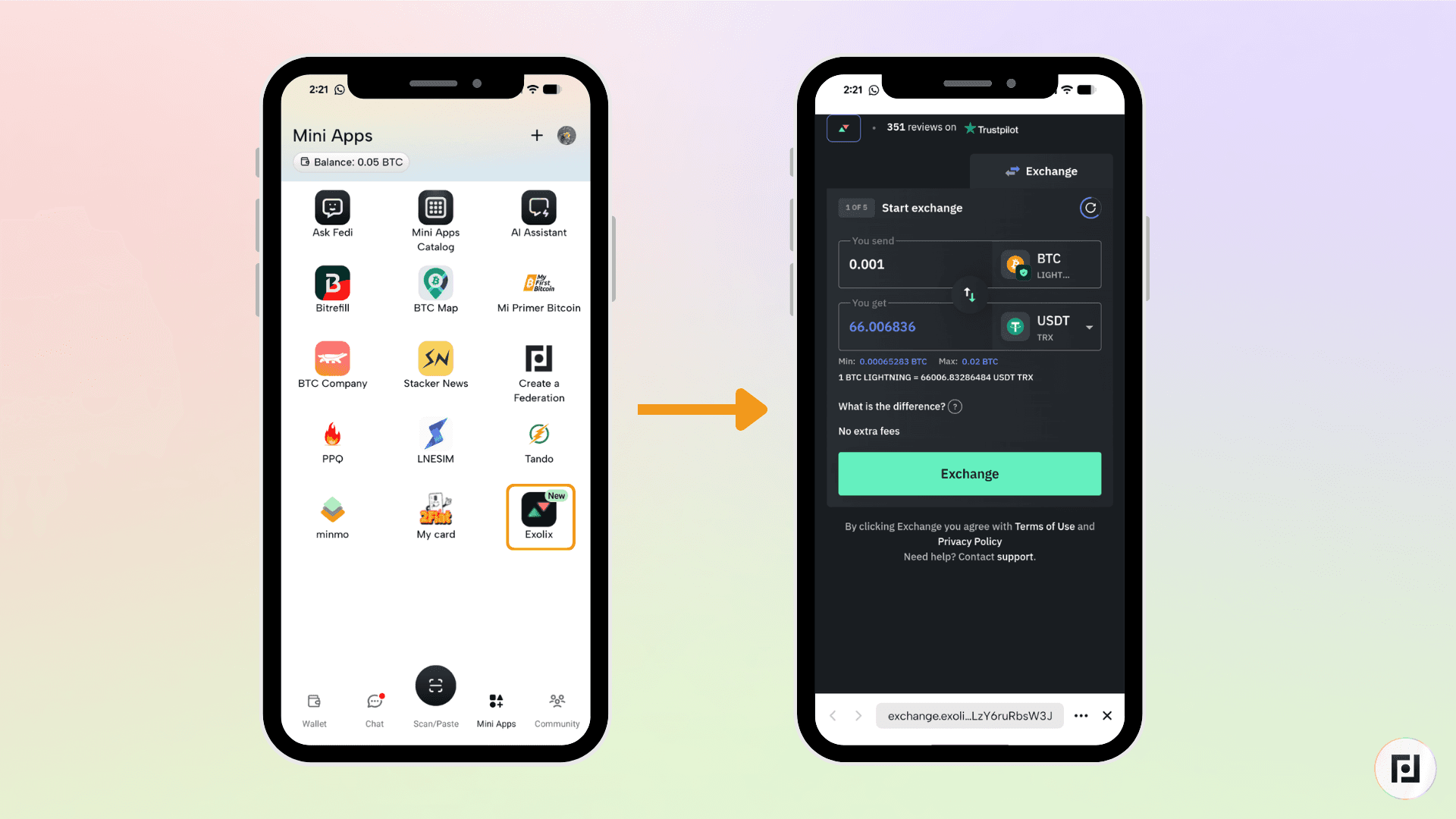
Step 2: Select your trading pair, then click “Exchange”.

Pro tip: Make sure to not only choose the assets you’d like to swap by the networks on which you’d like to swap them. For example, you can swap bitcoin on Lightning for tether on Tron.
Step 3: Click “Exchange” then enter the wallet address where you want to receive your swapped assets, then confirm.

Step 4: Pay from your Fedi wallet: Exolix generates a deposit address or Lightning invoice that you can paste into your Fedi wallet. The swap processes automatically, and most transactions complete within minutes.
That’s it!
The Exolix is the latest in a growing list of practical, privacy-respecting tools in the Fedi Mini Apps catalog.
Download Fedi to give it a try.
